A Recipe for Baking Up a Unique and Memorable Password 🔑
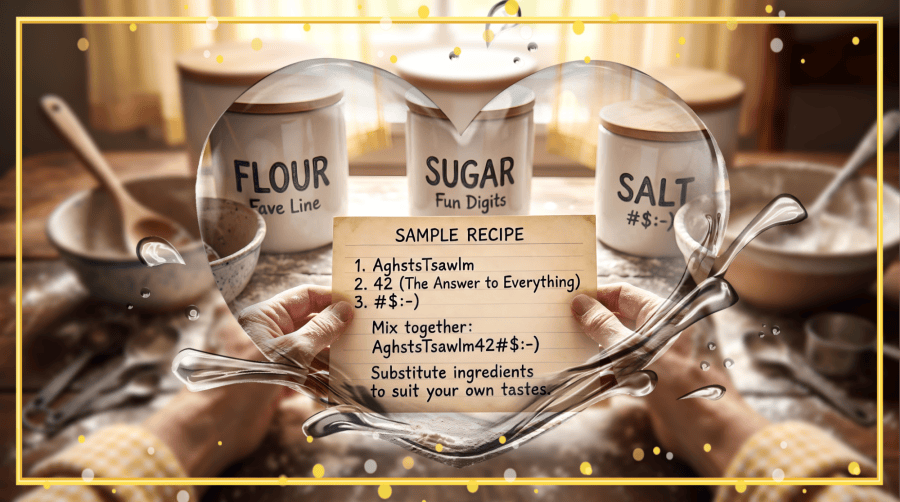
(CC BY-NC-SA 4.0) with Help from CoPilot, Gemini Nano, and Photo Studio Pro
Passwords! Most of us have a love/hate relationship with them. We know we want them to protect our most important information from those who would misuse it, but we hate trying to remember them. And just when we finally get one down from repetition, we get one of those notes saying, “It’s been three months since you last changed your password. You must change it now.” Some might even give you six months or a year, but most will expect new passwords sooner rather than later. (Or changing to a passkey, which can be easier once you learn it. But that needs its own post.)
So what can we do to protect ourselves online and protect our information filled minds at the same time? The answer is: Create unique & memorable passwords that are easy enough to change that we won’t get as stressed when the reminders to update come along. Many suggestions now use full lines of words that are not related but still easy to remember, and the longer the better. But unrelated words may slip away and put you in the battle to reset a forgotten password. So, I hope my recipe will help.
First, think of a line from a song or book you really like. Maybe it’s a song from childhood or your favorite singer’s newest release. But you’ll want more than just the title; you’ll want a full line or two. For a sample idea, as you can see in the picture above, I’m using the song “Amazing Grace” and the first couple of lines Amazing grace how sweet the sound. That saved a wretch like me. The first letter from each word spells AghstsTsawlm and even has a couple capital letters in there for site passwords with upper- and lower-case letter rules. From there, just follow the ingredients and instructions in my recipe, and hopefully you’ll be on your way to your own unique and memorable password creations.
Ingredients:
- The letters from the words in a favorite line from a song, hymn, Bible verse, poem, quote, or saying that you can easily remember.
- A meaningful number that you will remember but that is not publicly available online.
- A memorable symbol, like a favorite ASCII smiley face (not including the straight lines I added to keep them from converting to actual emojis when I hit publish):
- |:-)|
- |;‑)|
- |:-D|
- |:-P|
Instructions
- Once you choose a favorite line, write down one or two lines to get plenty of letters for your new password.
- Next, write down the first letter of each word, preserving capitalization where appropriate.
- For an extra twist, you can substitute the words “to” and “for” in your lines with the digits “2” and “4” to get numbers without the need to come up with extra ones after the line.
- Add a number that is meaningful to you but difficult for others to discover. (And if you’ve seen The Hitchhikers Guide to The Galaxy, you know why I used 42 in my example. 😁)
- Creative number ideas:
- The street number of a childhood home—especially if you can recall an address that belonged to a grandparent or other relative never tied to you in public documents.
- The page number of a favorite passage in a beloved book—Bible Scriptures work well here if you have both chapter and verse like 231 that could be Psalm 23 verse 1 or something with chapter 2 and verse 31. Only you would know that.
- The number of chapters in a book of the Bible that has special meaning to you. (Or the total books in the KJV Bible at 66, Old Testament 39 or New Testament 27.) Check the Bible Hub site for getting verse counts or chapter and verse numbers.
- A private family number or memory that would not appear in public records.
- A number connected to a personal milestone that is not publicly documented.
- Creative number ideas:
- Add a memorable symbol or symbol pattern like an ASCII image you like.
- Creative ASCII ideas from smileys to symbols:
- a victory cheer *\0/*
- a kitty cat (=^ . . ^=)
- a simple fish ><>
- Creative ASCII ideas from smileys to symbols:
Important Reminders:
- Never use information that someone could easily find online.
- Years ago, many suggested using a baptism year, membership or anniversary year, or other meaningful date. Today, much of that information may appear in online directories, ministry biographies, social media posts, public announcements, or genealogy websites. A good password (or piece of a password) should live in your memory, not in a search result.
- Use a different password for every important account. If one account is compromised, the others remain protected.
- Whenever possible, enable two-factor authentication for an extra layer of security.
Share this post on:

No comments yet.
My Latest Flickr Photos


Others’ Posts I’ve Liked


Start a conversation by adding your comments.