A Kaleidoscope Heart

I’m not certain when I looked into my first kaleidoscope, but I know when I first got really hooked on them. There was a big presentation at the Kentucky Center for the Arts back in 1993. Somehow, I got a ticket to it, and I got to take a class and build my first kaleidoscope. Shortly thereafter, I won a contest and used the prize money to buy my first professional kaleidoscope. It was made by Shelley Knapp, and I have an album of pictures from inside that scope on my Flickr page at https://www.flickr.com/gp/crystalwriter/iY6dMcF580 though I have many I’ve not yet added to the album.
After beginning that collection, I somehow ran across this very low-priced piece of software called The Silicon Mirror program. I got the free trial but paid the $12 to purchase it before the trial was over, and have kept it installed on various computers and laptops ever since. They still have it available at https://www.torpor.com/ where you can find a variety of creative and colorful programs. I wish I could play with all of them every day.
Anyway, I was on Yahoo Photos back then and had started my first blog on Yahoo 360. I was also writing my first NaNoWriMo (National Novel Writer’s Month) novel, so I would update the blog with my word count and a picture made in Silicon Mirror each day. I was able to save that blog here at WordPress under “Crystal Writes in 360” but I haven’t gone back to check for writing and grammar imperfections there. It was mostly family reading it back then, so I’m not sure how many mistakes there are. But if you venture over there, you will see the beginnings of my digital kaleidoscope addiction, and many of them were made from pictures of pencils and pens to line up with writing for NaNo.
Yahoo Photos got purchased by Flickr around 2006, I think, so I started putting photos there almost from the beginning. I have tens of thousands of them in my unpublished photos there because I never want to share until I can correctly label everything. This perfectionism drive is one of my big battles that keeps me from getting things done (or makes me take way too long as is often the case with this blog). But you can look at my big collection of kaleidoscope images (some real, many digital, 1069 images & 5 videos all together) in the Flickr album at https://www.flickr.com/gp/crystalwriter/pWx7X5586x
I have so much more I could say about kaleidoscopes, but I’ll close here for now with a collection I made in my Mirror Lab app using the image above. That image, by the way, was originally an inside scope picture that I edited in Photo Studio Pro to get it into a heart shape and then uploaded that to Wombo Dream AI and asked it to create a heart-shaped image. Here is the prompt I used in case you want to use it in your favorite AI image generator:
3D Heart-shaped kaleidoscope mandala with a 3d gilded edge and filled with colorful glittery prisms, on a black background with some super tiny golden sparkle in the black, HDR, pro photo, brilliantly lit, glowing, amazing atmosphere
And here’s the collection…
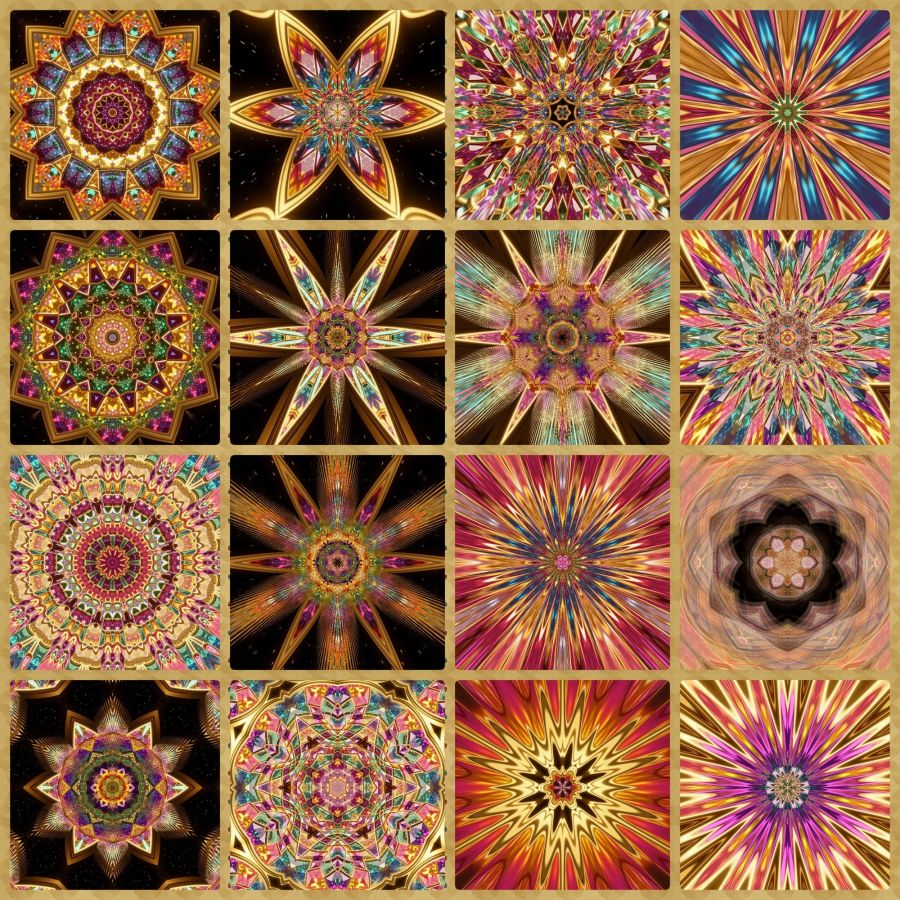
Many people tell me that they haven’t looked in a kaleidoscope since childhood. I highly recommend them for adults as tools to help with anxiety and stress because they create endorphins. I will do another post in the future with links to find kaleidoscopes online along with books and software because I really think they share what the name means, “beautiful image.” And I also believe they represent people the way God looks at His creation: all have beauty that is made more beautiful when light–especially God’s Light–shines through it. Let God light up your most beautiful aspects today and in the future, so you can be a kaleidoscope.
Share this post on:

The Chaos of Learning New Things (and how Gemini AI can help)…

I love learning! I’ve often compared myself to Johnny 5 from the movie Short Circuit because of my desire for more and more input. But the older I get, the harder it is to process that input as smoothly as before. Plus, with technology, I think confusion and chaos come standard.
One of the biggest problems, though, is the lack of help sources. It used to be that search engines could direct you to just the right place for the answers you needed, albeit sometimes they were several pages deep. Still, if you had a math question, you could find an answer from a mathematician. If you needed a recipe, you could find a cooking site. But now, the answers you get are based on sponsorships and marketing.
Tonight, I needed to install an app for my digital thermostat, and the info on the booklet didn’t match the updated app in the Google Play Store. In addition, the review score there was 2.5 with lots of complaints about how the new app wasn’t as good as the old one. What’s a girl to do with all that confusing information?
Well, my newest phone offered me a free one year trial of Gemini Pro by Google. I’ve had a few AI conversations with Copilot and a Bible AI search, but when I noticed how easy it was to feel like I was talking to a human, I decided to limit conversations to needs that couldn’t be met by searching. Well, except for image generation. I love being able to create things I can imagine but could never draw. But that’s a share for another day.
So I went to Gemini and asked how to tackle my current dilemma. To my amazement, it knew about the negative reviews, the switch of apps, and even solutions that made all the difference — enough of a difference for me to install and use the app plus give it a 5-star rating. For example, once I told it the make of my thermostat, it knew the kind of servers and firmware in my device and recommended a 2.4g Wi-Fi signal to not overwhelm it. It knew that Wi-Fi guest networks were usually slower and confirmed I should put my phone on the same guest network until the install was set up. I admit, it was a little scary that it could turn off my cellphone provider’s data temporarily to make sure the devices stayed on a matched service, but it saved me a step. And almost everything it told me to do worked perfectly, so I had none of the issues the complaining reviews mentioned. I felt so victorious when I accomplished that task.
Finally, when everything was done, it asked if I wanted help drafting a review for those new to the app who were only seeing negative reviews and complaints. It gave me a long, detailed review, but I had to tell it to keep it under 500 characters for Google Play Store reviews. I was a bit surprised it didn’t know that. Anyway, I tweaked it a bit, but it made me feel so good to be able to post a high rating since anyone using the app with a new Carrier system needs to know they can trust it to work as it’s supposed to work. It’s hard to trust, and learn something new, when you’re awash in negative reviews and mismatched paperwork. I’ll post the review for the “SmartHome by Carrier Corporation” app in case some of the steps I took might work for other modern tech devices as well. Maybe this will have the answer for someone out there.
With Gemini’s help, I made this work. It works great on the 2026 firmware update and the app 2026 update if you follow these steps for manual setup.
1. Connect wall unit to 2.4GHz/Guest WiFi & put device with app on the same 2.4 signal. IMPT: Do the firmware update first & let it finish (Carrier logo on screen).
2. Skip the QR scan—it fails.
3. In the app, choose “Infinity System” (NOT Smart Thermostat).
4. Use “Manual Entry” for Serial/MAC/PIN from the wall unit’s Wireless > MyInfinity menu.
It’s hard to put that many details in 500 characters, but my personality of always wanting to be helpful hopes it will enable some who failed in the task to now accomplish it. And if my readers cannot use all the info, at least maybe you’ve learned that your Wi-Fi guest network is not likely 5GHz and that 2 devices wishing to communicate should not only be on the same Wi-Fi network, but also at the same speed.
Share this post on:

My Latest Flickr Photos


Others’ Posts I’ve Liked


 Crystal Writes A Blog